---
title: "MFA for SaaS: Implementation Guide"
description: "Deploy phishing‑resistant MFA in SaaS: use passkeys/FIDO2 for high‑risk roles, TOTP/push for users, IdP enforcement and step‑up controls."
image: https://assets.seobotai.com/cdn-cgi/image/quality=75,w=1536,h=1024/optiblack.com/6a41ba012902db05ecd840fc-1782698576775.jpg
---
OPTIBLACK
- [Services](https://optiblack.com/services)
- [Customers](https://optiblack.com/customers)
[Book a strategy call](https://optiblack.com/book-a-call)
- [Services](https://optiblack.com/services)
- [Customers](https://optiblack.com/customers)
[Book a strategy call](https://optiblack.com/book-a-call)
[Information](https://optiblack.com/insights/tag/information) Jun 29, 2026, 7:30:30 AM · 15 min read
# Ultimate Guide to MFA for SaaS Applications

Vishal Rewari
Optiblack
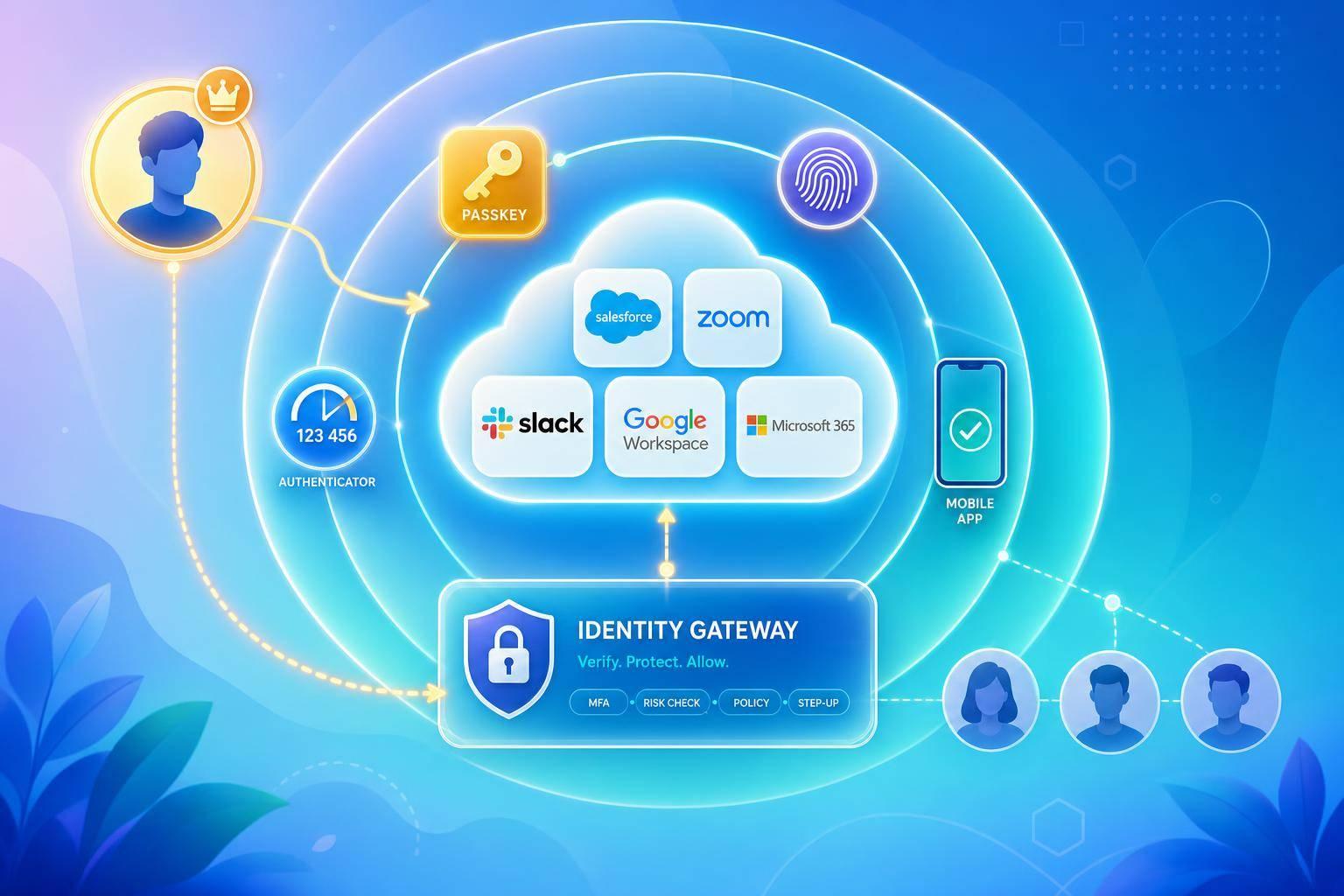
**If you run a SaaS app, MFA should be on by default.** Stolen credentials show up in **more than 50% of breaches**, and Microsoft says MFA blocks **99.9% of automated password attacks**.
Here’s the short version:
- I’d use **passkeys or [FIDO2](https://en.wikipedia.org/wiki/WebAuthn) security keys** for admins, developers, finance users, and anyone with high-risk access.
- I’d use **[TOTP](https://en.wikipedia.org/wiki/Time-based_one-time_password) apps** or **push with number matching** for most standard users.
- I’d keep **SMS and email codes** as backup-only options, not the main sign-in method.
- I’d enforce MFA through the **identity provider (IdP)** with **SSO, [SAML](https://en.wikipedia.org/wiki/SAML), or [OIDC](https://openid.net/developers/how-connect-works/)** so rules stay the same across apps.
- I’d add **step-up checks** for high-risk actions like API key creation, billing changes, data exports, and admin role changes.
- I’d track **logs, resets, bypasses, [OAuth](https://en.wikipedia.org/wiki/OAuth) grants, and session risk** because login protection alone does not stop token theft or post-login abuse.
A few points matter more than the rest:
- **Method choice matters.** Not all MFA types stop phishing.
- **Role matters.** A company admin should not use the same setup as a low-risk end user.
- **Policy matters.** Auditors want written rules, logs, reset controls, and time-limited exceptions.
- **Rollout matters.** Start with admins and high-risk systems, then move across the company in phases.
- **Maintenance matters.** MFA drift, weak recovery flows, and stale OAuth grants can open gaps later.
## A Better Way to MFA - Best Practices to Streamline Security | [JumpCloud](https://jumpcloud.com/) Webinar
VIDEO
###### sbb-itb-18d4e20
## Quick comparison
| MFA method | Phishing resistance | Friction | Best fit |
| --- | --- | --- | --- |
| **SMS / Email OTP** | Low | Low | Backup-only, low-risk use cases |
| **TOTP app** | Medium | Medium | Standard workforce access |
| **Push MFA** | Medium | Low | General user sign-in |
| **Push + number matching** | Medium-High | Low | General workforce with better prompt control |
| **FIDO2 security key** | High | Medium | Admins, developers, finance, high-risk roles |
| **Passkey** | High | Low | Modern SaaS sign-in for both B2B and B2C |
| **Biometric with WebAuthn** | High | Low | Device-based sign-in, mobile and desktop |
If I had to reduce the whole guide to one line, it would be this: **use phishing-resistant MFA for high-risk accounts, enforce it in one place, and treat recovery and session controls as part of the same system.**
## MFA Methods and How to Choose the Right Ones
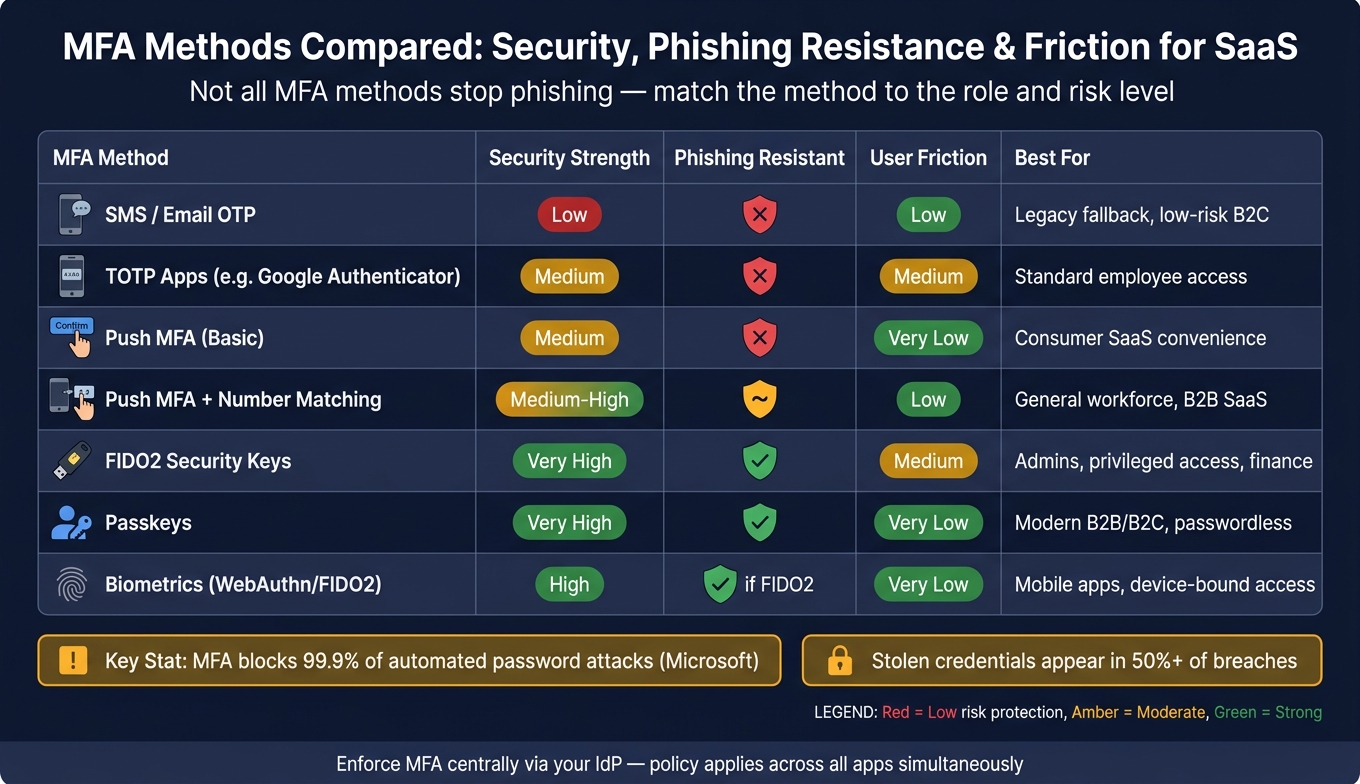
MFA Methods Compared: Security, Phishing Resistance & Friction for SaaS
Not all MFA methods protect accounts in the same way. The right pick depends on the user's role, what they can access, and how likely they are to face phishing. It also needs to line up with how you enforce MFA through SSO and central identity controls.
### Authenticator Apps, Push MFA, and One-Time Codes
**TOTP apps** like [Google Authenticator](https://support.google.com/accounts/answer/1066447?hl=en&co=GENIE.Platform%3DAndroid) or [Authy](https://authy.com/) are the starting point for most SaaS setups. They're free, work offline, and are safer than SMS. But there's a catch: they can still be beaten by real-time phishing proxies, where an attacker grabs the code as soon as the user enters it.
**Push MFA** is easy for users, which is why teams like it. The downside is push fatigue attacks. If users get hit with enough prompts, some will tap approve just to make them stop. Number matching helps block that. It asks the user to enter a code shown on the login screen into the app before approval goes through.
**SMS and email OTPs are the weakest options.** SMS can be hit by SIM swapping and message interception. Email OTP is only as safe as the email account behind it. These methods can work as backups in low-risk cases, but they shouldn't be the main factor for employees or privileged accounts.
> "Any MFA is better than no MFA." - OWASP
### Security Keys, Passkeys, and Biometric Authentication
**FIDO2 security keys** and **passkeys** are the top choice for phishing resistance because they are cryptographically tied to the origin. Put plainly, if someone lures a user to a fake login page, the credential won't work on the wrong domain.
FIDO2 security keys usually cost **$25 to $70 per device**. **Passkeys** are becoming the default path for passwordless sign-in. They rely on one credential that the user unlocks with a biometric check or a device PIN on devices like [Touch ID](https://en.wikipedia.org/wiki/Touch_ID) or [Windows Hello](https://www.microsoft.com/en-us/windows/tips/windows-hello). For SaaS teams, that can cut password-reset support work and help improve conversion rates.
**Biometrics are at their best when paired with FIDO2/WebAuthn.** In that setup, they get the same phishing-resistant properties as passkeys.
### Matching MFA Methods to User Roles and Risk Levels
MFA strength should match account risk and access scope. Admin and developer accounts need phishing-resistant methods because a compromise there can spread damage far beyond one user. That's why role-based tiers make more sense than one blanket MFA rule for everyone.
Here’s how the main methods stack up across security, phishing resistance, user friction, compliance fit, and common SaaS use cases:
| Method | Security Strength | Phishing Resistant | User Friction | Compliance Fit | Common SaaS Use Case |
| --- | --- | --- | --- | --- | --- |
| **SMS / Email OTP** | Low | No | Low | Poor (Restricted) | Legacy fallback, low-risk B2C |
| **TOTP Apps** | Medium | No | Medium | Good | Standard employee access |
| **Push (Basic)** | Medium | No | Very Low | Fair | Consumer SaaS convenience |
| **Push (Number Match)** | Medium-High | Partially | Low | Good | General workforce, B2B |
| **Security Keys (FIDO2)** | Very High | Yes | Medium | Excellent | Admins, privileged access |
| **Passkeys** | Very High | Yes | Very Low | Excellent | Modern B2B/B2C, passwordless |
| **Biometrics** | High | Yes (if FIDO2) | Very Low | Good | Mobile apps, device-bound access |
Use tiered enforcement so the level of assurance matches the account's blast radius. Picking a method is only the first step. Policy, SSO, and audit evidence decide whether MFA stands up in production.
## MFA Policy, Compliance, and Architecture for US SaaS Teams
Picking an MFA method is only half the job. It also has to be enforced the same way across every app, user, and system. That means turning your MFA setup into a written policy, a set of controls, and a clean audit trail.
Use **AAL2** for most SaaS logins and **AAL3** for privileged actions like admin grants, billing changes, and API key creation. [SOC 2](https://en.wikipedia.org/wiki/System_and_Organization_Controls), [HIPAA](https://en.wikipedia.org/wiki/Health_Insurance_Portability_and_Accountability_Act), and [PCI DSS](https://www.pcisecuritystandards.org/standards/pci-dss/) all push MFA at the access boundary.
### Building an MFA Policy for Auditors and Operators
A written MFA policy turns a technical setting into something auditors can test and operators can follow. It should spell out who is in scope, which authenticators are allowed, when step-up authentication is required, how long sessions stay valid, and what to do when a legacy system can’t support modern protocols.
Exceptions need to be written down. Every bypass should have an owner, a compensating control like IP allowlisting, and an expiration date. If a legacy app doesn’t support modern protocols, put a reverse proxy or VPN gateway in front of it. A centralized exception register makes it much easier to see what was approved and when it needs review.
The table below turns MFA method selection into policy by role and risk:
| User Role | Required MFA Method | Step-Up Triggers | Audit Evidence Needed |
| --- | --- | --- | --- |
| **Standard User** | TOTP, push with number matching, or passkey | New device, new location, 24 hours | Timestamp, IP, device ID |
| **Admin / Developer** | FIDO2 security key or platform authenticator | Every session, role grant, API key generation, data export | Enrollment log, challenge type, device ID, IP address |
| **Finance / Billing** | Hardware-bound FIDO2 security key | All logins, payment method change, high-value spend | Verification ID, timestamp |
| **External Contractor** | Any approved MFA, no SMS | Every login | Access duration, login timestamp, app-specific logs |
Vendor and contractor access needs its own rule. External users should get prompted on every login, with no persistent sessions. And for elevated access, SMS should stay off the approved list.
### Using SSO, [SAML](https://en.wikipedia.org/wiki/SAML), [OAuth](https://en.wikipedia.org/wiki/OAuth), and [OIDC](https://openid.net/developers/how-connect-works/) to Enforce MFA Centrally
Role-based MFA starts to break when each app handles enforcement in its own way. The better path is to enforce MFA in the IdP with SAML or OIDC so every app follows the same policy.
For enterprise tenants, use SSO for the main identity assertion, then add step-up authentication for sensitive actions. If a user tries to export bulk customer data, change billing details, or create a production API key, that action should trigger a new MFA challenge even if the session is still active. OAuth tokens can outlive MFA, which is where teams get burned, so inventory and review all grants on a regular basis.
### Logging, Evidence, and Audit Readiness
Logs are how you show MFA is working, not just switched on. Capture factor enrollment, successful and failed challenges, step-up triggers, bypass events, recovery actions, device identifiers, IP addresses, and impossible-travel signals.
Keep per-tenant logs for at least one year. Store them in immutable, tamper-evident storage so they can’t be changed after the fact. Send log exports into your SIEM so odd behavior shows up in real time instead of only during quarterly reviews. Those same logs also support step-up rules, recovery review, and incident response.
Recovery procedures get heavy scrutiny because MFA resets are often the weakest link. Require manager approval or a video verification step before any factor reset for a privileged account. Use single-use backup codes at enrollment, and reject security question-based recovery.
## How to Deploy and Strengthen MFA in Production
Once the policy and architecture are set, the next step is simple: make MFA work in live systems. A policy on paper doesn't help much if the rollout falls apart in production.
### A Phased MFA Rollout Plan for SaaS Organizations
Start with a full inventory of every SaaS app, shadow IT tool, and OAuth grant. Then map which systems support MFA and which ones depend on your IdP.
Before you flip the switch for the whole company, run a small pilot with IT staff and technically comfortable volunteers. This is where you catch the annoying stuff early: rough enrollment steps, unclear setup docs, and recovery flow problems that would otherwise hit everyone at once.
Roll out MFA from **highest risk to lowest**: admins, VPN and remote access, email, critical cloud apps, and then the rest of the company.
Give people notice before each phase starts, and tell them *why* it's happening. Short video walkthroughs and visual setup guides can cut down support tickets fast. You can also allow limited deferrals before access is blocked.
| Phase | Main Technical Tasks | Owners | Expected Outcomes |
| --- | --- | --- | --- |
| **1. Assessment** | Audit SaaS stack; map high-risk roles and legacy app gaps | IT / Security | Full inventory with risk map |
| **2. Pilot** | Enable MFA for IT and tech-savvy volunteers; test recovery flows | IT Team | Validated enrollment, bug fixes |
| **3. Enrollment** | Launch communication campaign; publish setup guides and videos | HR / Comms | High voluntary enrollment |
| **4. Staged Enforcement** | Mandate MFA for admins, then VPN, then all users | Security Ops | Full coverage for privileged accounts |
| **5. Optimization** | Add adaptive MFA; monitor for fatigue and helpdesk volume | Security Ops | Lower friction, fewer tickets |
It also helps to open a dedicated support channel for the first few days of each enforcement phase. When people get locked out or hit enrollment issues, a team that can fix the problem in real time makes a big difference.
One more thing: require users to generate and store one-time recovery codes during enrollment. Don't leave this for later. Make it a required part of the flow.
After you have broad coverage, the focus shifts. The goal is no longer just enforcement. It's reducing friction without giving up control.
### Adaptive MFA, Step-Up Authentication, and Session Risk Controls
After rollout, move from universal enforcement to risk-based enforcement. Static MFA tends to create prompt fatigue, and that doesn't do much for low-risk access.
A better setup uses risk-based triggers. Look at signals such as device fingerprint, IP reputation, geo-velocity, impossible travel, and whether the device is managed or personal. A managed laptop in the office shouldn't face the same friction as an admin login from an unusual location.
Use step-up authentication for sensitive actions like:
- Password changes
- PII access
- Admin changes
- Payment updates
Short session lifetimes for standard users, plus reauthentication for admins, can limit the blast radius if a token gets stolen.
To block push-bombing attacks, turn on number matching. Instead of tapping **Approve**, the user has to enter a code shown on the login screen into their authenticator app. Also rate-limit push prompts and alert security when repeated attempts show up.
### Protecting APIs, Service Accounts, and Non-Human Access
Non-human access needs its own controls because it can't complete MFA. Machine identities need a different setup.
Use OAuth client credentials, mTLS, and managed identities instead of passwords or shared secrets. Rotate secrets on a set schedule, and monitor each token for odd behavior, like sudden spikes in request volume or calls from unexpected IP ranges.
Admins who manage service accounts should use FIDO2 security keys for every session. Legacy protocols such as POP and IMAP that can't support modern MFA should be disabled outright or locked down to specific, audited service principals that use app passwords.
Keep at least one break-glass account offline, tested, logged, and outside normal IdP MFA flows. Store it as part of outage recovery, and log and review every use after each incident.
## Operating MFA Over Time and Final Takeaways
MFA rollout is just the beginning. The day you turn it on isn't the day the job is done. Governance is what keeps coverage current as apps change, people move into new roles, and attackers shift tactics.
### Monitoring, Governance, and Incident Response
MFA coverage drifts over time. New apps show up, users switch roles, and service accounts pile up. If nobody checks the system on a set cadence, gaps can open quietly.
Treat MFA as a **coverage metric**, not a one-and-done setup.
The table below shows the main metrics to track, who owns them, and how often to review them:
| Metric | Responsible Team | Review Frequency |
| --- | --- | --- |
| **MFA Adoption Rate** | IT / Identity Team | Monthly |
| **Factor Mix** (% Passkeys vs. TOTP) | Identity Architecture | Quarterly |
| **Bypass Rate** | Security Operations | Weekly |
| **Push Fatigue Signals** | SOC / ITDR | Real-time |
| **Recovery Resets** | Security / IT Admin | Weekly |
| **Deprovisioning Gaps** | HR / IT Ops | Quarterly |
| **Geo-Velocity Anomalies** | Security Operations | Real-time |
These signals should feed policy updates, recovery changes, and enforcement tweaks before small holes turn into bigger ones.
Your incident response process also needs to cover MFA-specific cases: push bombing, account recovery abuse, token replay, and rogue OAuth consent grants after a user has already passed MFA. Those are the same post-login risks covered earlier in the session risk and OAuth sections. When an identity incident happens, check three things right away: whether MFA was on, which factor was used, and whether recovery was triggered.
For any privileged factor reset, require video verification or manager approval. Recovery flows should never quietly skip the second factor.
### Key Points to Carry Into Your MFA Program
Once coverage is steady, the focus shifts from rollout to **control quality**.
A small set of choices has an outsized effect on whether MFA keeps doing its job. Use FIDO2 keys or passkeys by default for admins and anyone with access to sensitive data or payment systems. For standard users, use TOTP or number-matched push. Keep SMS as a last-resort backup because of SIM-swapping and SS7 risk.
Policy should follow role and risk, not convenience. It also helps to centralize enforcement in the IdP, so policy updates apply across the SaaS estate at the same time. And monitoring can't be treated as a side task. It's part of the control itself, because token replay, rogue OAuth grants, and session hijacking happen *after* login.
For teams updating SaaS and AI systems, [Optiblack](https://optiblack.com) supports the product, data, and analytics foundation that scalable access controls depend on.
## FAQs
### Which MFA method is best for my users?
There’s no one-size-fits-all MFA method. The right pick depends on your risk level and what your users can handle day to day.
**FIDO2-based methods** - including hardware security keys and passkeys - are the gold standard. They’re the only options that use cryptography to block phishing in a meaningful way.
For most employees, TOTP apps are a solid, low-cost baseline. They strike a good balance between security, price, and ease of use.
For high-risk roles, though, that baseline isn’t enough. Those users need phishing-resistant MFA.
The practical move is to use adaptive, risk-based policies. That way, you can apply stricter MFA only when the situation calls for it, instead of putting every user through the same level of friction.
### When should I require step-up authentication?
Require step-up authentication when users try to do something sensitive or reach a high-risk resource. That way, you keep security tight **without interrupting people all the time**.
Common triggers include:
- Changing passwords or account email addresses
- Disabling MFA or switching a session to admin status
- Accessing sensitive data or showing unusual behavior, especially on untrusted networks
### How do I roll out MFA without disrupting users?
Use risk-based sign-in checks instead of static challenges. That means MFA shows up only when it’s needed, based on live signals like device trust, location, and user behavior. Low-risk logins stay smooth, so people aren’t forced through extra steps every time.
For an easier rollout, start with a pilot group and explain the security upside in plain English. Give people a choice of sign-in methods, such as authenticator apps or passkeys. Also, make sure you have a solid account recovery process in place so users don’t get locked out.
## Related Blog Posts
- [7 Best Practices to Secure CI/CD Pipeline](https://optiblack.com/blog/7-best-practices-to-secure-cicd-pipeline/)
- [How Quantum-Safe Encryption Protects SaaS Data](https://optiblack.com/blog/how-quantum-safe-encryption-protects-saas-data/)
- [Real-Time Personalization in SaaS: How It Works](https://optiblack.com/blog/real-time-personalization-in-saas-how-it-works/)
- [10 RPA Security Best Practices for Compliance](https://optiblack.com/blog/10-rpa-security-best-practices-for-compliance/)

Vishal Rewari
[#Information](https://optiblack.com/insights/tag/information)
/ Keep reading
## More from Optiblack
[-3.png) Case Studies From Zero to a Multi-Region Analytics Backbone: How OptiBlack Built Scrut's Entire Data Platform](https://optiblack.com/insights/from-zero-to-a-multi-region-analytics-backbone-how-optiblack-built-scruts-entire-data-platform) [-4.png) Information AI in Geographic Segmentation: Key Use Cases](https://optiblack.com/insights/ai-geographic-segmentation-key-use-cases) [-3.png) News RealBooks Selects Optiblack as Strategic Analytics Partner to Build Modern Data Stack for Real Estate Investors](https://optiblack.com/insights/realbooks-selects-optiblack-as-strategic-analytics-partner-to-build-modern-data-stack-for-real-estate-investors)
/ 15-minute exploration call
## Turn these insights into revenue.
We'll go through your CRM, product, and analytics data together and show you exactly where growth is leaking. No setup. No dashboards. Just signal.
[Book a strategy call →](https://optiblack.com/book-a-call)
[OPTIBLACK](https://optiblack.com/)
US: 1309 Coffeen Ave, Suite 1200, Sheridan, WY 82801 · +1 682 297 2970 — India: 297 Designs, 74 SBK Society, Paldi, Ahmedabad 380007 · +91 9819394297
Services
[Data services](https://optiblack.com/services) [CRM services](https://optiblack.com/services) [AI services](https://optiblack.com/services) [Book a call](https://optiblack.com/services)
Company
[Customers](https://optiblack.com/customers) [About Us](https://optiblack.com/about-us) [Insights](https://optiblack.com/insights)
© 2026 Optiblack · 2× Mixpanel Partner of the Year · vishal@optiblack.com
```json
{
"@context" : "https://schema.org",
"@type" : "BlogPosting",
"author" : {
"@type" : "Person",
"name" : "Vishal Rewari",
"url" : "https://optiblack.com/insights/author/vishal-rewari"
},
"datePublished" : "2026-06-29T02:00:30.000Z",
"headline" : "MFA for SaaS: Implementation Guide",
"image" : [ "https://assets.seobotai.com/cdn-cgi/image/quality=75,w=1536,h=1024/optiblack.com/6a41ba012902db05ecd840fc-1782698576775.jpg" ],
"mainEntityOfPage" : {
"@id" : "https://optiblack.com/insights/mfa-saas-applications-ultimate-guide",
"@type" : "WebPage"
},
"publisher" : {
"@type" : "Organization",
"logo" : {
"@type" : "ImageObject",
"url" : "https://optiblack.com/hubfs/Group%201234.png"
},
"name" : "Optiblack"
}
}
```
```json
{
"@context" : "https://schema.org",
"@type" : "FAQPage",
"mainEntity" : [ {
"@type" : "Question",
"acceptedAnswer" : {
"@type" : "Answer",
"text" : "There’s no one-size-fits-all MFA method. The right pick depends on your risk level and what your users can handle day to day.
FIDO2-based methods - including hardware security keys and passkeys - are the gold standard. They’re the only options that use cryptography to block phishing in a meaningful way.
For most employees, TOTP apps are a solid, low-cost baseline. They strike a good balance between security, price, and ease of use.
For high-risk roles, though, that baseline isn’t enough. Those users need phishing-resistant MFA.
The practical move is to use adaptive, risk-based policies. That way, you can apply stricter MFA only when the situation calls for it, instead of putting every user through the same level of friction.
"
},
"name" : "Which MFA method is best for my users?"
}, {
"@type" : "Question",
"acceptedAnswer" : {
"@type" : "Answer",
"text" : "Require step-up authentication when users try to do something sensitive or reach a high-risk resource. That way, you keep security tight without interrupting people all the time .
Common triggers include:
Changing passwords or account email addresses Disabling MFA or switching a session to admin status Accessing sensitive data or showing unusual behavior, especially on untrusted networks "
},
"name" : "When should I require step-up authentication?"
}, {
"@type" : "Question",
"acceptedAnswer" : {
"@type" : "Answer",
"text" : "Use risk-based sign-in checks instead of static challenges. That means MFA shows up only when it’s needed, based on live signals like device trust, location, and user behavior. Low-risk logins stay smooth, so people aren’t forced through extra steps every time.
For an easier rollout, start with a pilot group and explain the security upside in plain English. Give people a choice of sign-in methods, such as authenticator apps or passkeys. Also, make sure you have a solid account recovery process in place so users don’t get locked out.
"
},
"name" : "How do I roll out MFA without disrupting users?"
} ]
}
```