
-2.png)
Managing PaaS costs is tough, but automation can help. Businesses often face challenges like unexpected scaling expenses, idle resources, and tracking costs across multiple cloud providers. Without the right tools, these issues can lead to wasted spending - 32% of cloud budgets are typically wasted, costing organizations billions annually.
Key Takeaways:
- Scaling Problems: Misconfigured autoscalers and runaway workloads can drive up costs.
- Resource Waste: Overprovisioning and unused resources inflate expenses.
- Multi-Cloud Complexity: Tracking costs across providers is challenging, especially with poor tagging and hidden fees.
- Manual Management: Reserved Instances and Spot Instances offer savings but are hard to manage manually.
Automation Solutions:
- AI Rightsizing: Continuously adjusts resources to match usage, reducing waste.
- Cost Attribution: Links expenses to business metrics for better visibility.
- Start-Stop Scheduling: Shuts down non-production environments when not in use, saving up to 75%.
- Spot Instance Management: Automates workload shifts to maximize savings.
Automation tools not only cut costs but also reduce manual effort, empowering teams to focus on growth instead of firefighting cloud bills.
Logic Apps, automation & cost management
sbb-itb-18d4e20
Common PaaS Cost Challenges
While PaaS offers scalability and adaptability, it can also introduce unexpected costs that quickly strain budgets. Addressing these challenges is essential for maintaining financial control.
Unexpected Scaling Costs
Autoscaling aims to match resources with demand, but misconfigurations can lead to skyrocketing expenses. For instance, improperly set minimum or maximum instance limits can cause costs to spiral during traffic surges. In Kubernetes environments, conflicts arise when both the Horizontal Pod Autoscaler (HPA) and Vertical Pod Autoscaler (VPA) target the same metric, like CPU usage. This can result in erratic resource allocation and unexpected charges.
Another issue is thrashing, where rapid scaling up and down occurs due to overly sensitive thresholds. This constant churn drives up costs without providing real benefits. Even more concerning are runaway workloads, such as infinite loops in data pipelines or misconfigured background tasks. These can trigger autoscalers to allocate excessive compute resources, often going unnoticed until significant overspending has occurred. Native cloud tools, which typically operate on delayed billing data, may not flag the issue in time.
"Cloud cost optimization is not about cutting corners. It is about aligning what you pay for with what you actually use." - HelpBot
These scaling problems often lead to broader inefficiencies, as detailed below.
Idle and Overprovisioned Resources
To avoid performance issues, teams frequently overprovision resources like CPU, memory, and storage. This results in many instances running far below capacity, yet still incurring full costs. Non-production environments often remain active 24/7, even when they’re only needed for limited periods. Additionally, orphaned volumes and snapshots can continue to generate charges long after their associated instances are decommissioned.
Traditional cost reports often highlight these inefficiencies only after weeks of wasteful spending. For example, an underutilized instance costing $3,000 per month might go unnoticed for months, burning through thousands of dollars. Modern PaaS platforms and tools like Kubernetes add layers of abstraction that obscure actual resource usage, making it even harder to pinpoint waste.
By implementing rightsizing strategies, teams can typically reduce compute costs by 20% to 40%. Scheduled shutdowns for non-production environments can cut expenses by 50% to 70%. However, identifying these opportunities requires proactive monitoring.
"Engineers don't overprovision out of malice. They do it because their job is reliability." - Kelsey Rosen, FinOps Leader
In multi-cloud setups, these inefficiencies become even harder to track.
Multi-Cloud Cost Attribution Complexity
Managing costs across multiple cloud providers introduces significant tracking challenges. Each provider uses its own billing format - AWS has Cost and Usage Reports (CUR), Azure relies on Enterprise Agreements, and GCP exports billing data to BigQuery. Native tools generally provide visibility only within their respective ecosystems.
Shared resources add another layer of complexity. For example, determining how to allocate the cost of a NAT gateway or cross-availability-zone traffic can be tricky. In Kubernetes, while nodes are billable, ephemeral pods complicate accurate cost attribution. Nearly half of teams report that Kubernetes adoption has increased their cloud spending due to overprovisioning and visibility gaps. Poor tagging practices further exacerbate the problem, leaving over 35% of cloud expenses unallocated.
Data egress fees also add hidden costs. Transferring data between providers can cost anywhere from $0.09 to $0.15 per GB.
"Managing costs across multiple cloud providers is exponentially harder than optimizing a single environment." - IDACORE
Manual Reserved Instance Management
Reserved Instances (RIs), Savings Plans, and Spot Instances offer steep discounts - Spot Instances alone can save 60% to 90% compared to on-demand pricing. However, managing these options requires precise forecasting and real-time adjustments to avoid paying for unused capacity.
As demand patterns shift, teams may find themselves stuck with unused capacity or scrambling to meet unexpected spikes at full on-demand rates. Spot Instances add further complexity, as providers can reclaim them with just 30 to 120 seconds' notice. If applications aren’t designed to handle termination signals, engineers often disable autoscaling entirely, leading to full-capacity usage around the clock - defeating cost-saving efforts.
Manually managing utilization reports and commitments increases the risk of billing surprises. This highlights the importance of automation in simplifying these processes and avoiding unnecessary costs.
Automation Solutions for PaaS Cost Optimization
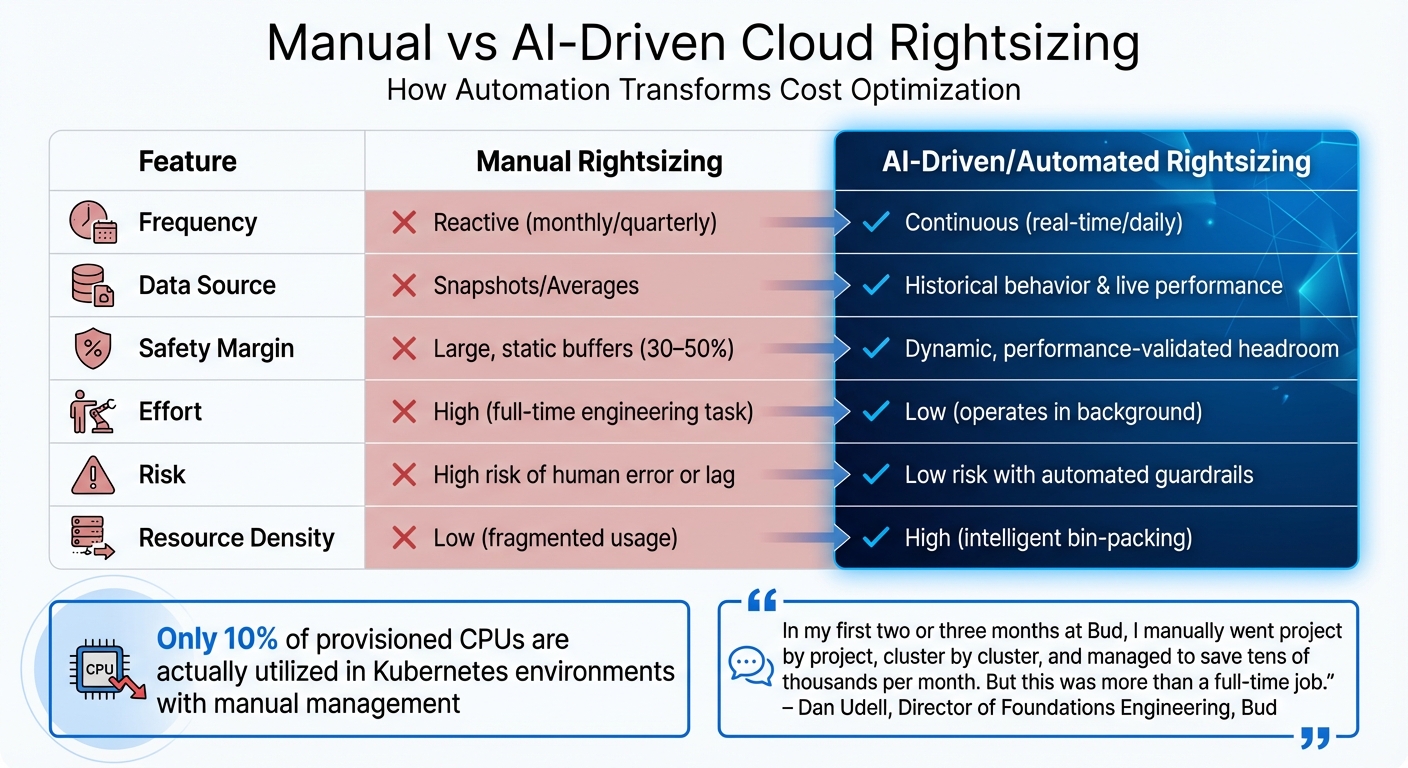
Manual vs AI-Driven Cloud Cost Optimization Comparison
Automation replaces the need for manual audits with real-time, machine-learning-based tools that optimize costs as they happen. These tools use predefined policies and continuous analysis to tackle common issues like unexpected scaling expenses, idle resources, multi-cloud complexities, and manual commitment management. By removing human bottlenecks, they respond instantly to changing conditions.
AI-Driven Rightsizing and Autoscaling
Traditional rightsizing involves periodic reviews of performance data, with teams making adjustments based on averages. To avoid outages, engineers often add safety buffers of 30% to 50%, leading to significant waste. For instance, in Kubernetes environments, only 10% of provisioned CPUs are actually utilized.
AI-driven tools take a different approach. They continuously analyze detailed metrics - like CPU, memory, and IOPS - over 14 to 30 days to account for usage spikes. Using advanced metrics such as P95 or P99, these tools ensure scaled-down instances can handle peak traffic without manual intervention. This eliminates the need for periodic reviews.
"In my first two or three months at Bud, I manually went project by project, cluster by cluster, and managed to save tens of thousands per month. But this was more than a full-time job."
– Dan Udell, Director of Foundations Engineering, Bud
Automation operates on three levels: the Horizontal Pod Autoscaler (HPA) adjusts the number of pods, the Vertical Pod Autoscaler (VPA) modifies pod sizes, and the Cluster Autoscaler (CA) manages physical hardware. Advanced platforms prevent conflicts between HPA and VPA, which otherwise could lead to erratic provisioning and unexpected billing spikes.
AI-powered bin-packing further optimizes resource usage by consolidating workloads onto fewer servers. This allows idle nodes to shut down immediately, stopping the billing clock. Additionally, low-priority "Pause Pods" can temporarily occupy server space and are evicted instantly when high-priority applications scale up, ensuring no delays.
One notable example is Yotpo. In November 2025, they integrated Cast AI to manage Spot Instances, running 80% of workloads on this cost-saving option. During a Black Friday surge, the automation seamlessly switched workloads between Spot and On-Demand instances based on availability and cost. As Achi Solomon, Director of DevOps, put it: "After integrating Cast AI, we didn't have to do anything during Black Friday, which is amazing. We gained not just compute cost reduction but also a reduction in engineer workload".
PlayPlay, a video platform, achieved nearly 62% cost savings by replacing 13 nodes with more efficient virtual machine sizes through automated rebalancing, all without service interruptions. Similarly, Heureka Group reduced compute costs for its development cluster by 30% using automated bin-packing for Spot-friendly workloads and promptly removing unused nodes.
| Feature | Manual Rightsizing | AI-Driven/Automated Rightsizing |
|---|---|---|
| Frequency | Reactive (monthly/quarterly) | Continuous (real-time/daily) |
| Data Source | Snapshots/Averages | Historical behavior & live performance |
| Safety Margin | Large, static buffers (30–50%) | Dynamic, performance-validated headroom |
| Effort | High (full-time engineering task) | Low (operates in background) |
| Risk | High risk of human error or lag | Low risk with automated guardrails |
| Resource Density | Low (fragmented usage) | High (intelligent bin-packing) |
AI policies typically aim for an average CPU utilization of 60% to 70% in production environments, leaving enough buffer for unexpected demand surges. Guardrails can restrict automated changes to maintenance windows and include rollback protections if error rates or latency increase, ensuring stability.
While dynamic scaling optimizes resource usage, understanding the cost per unit of usage provides deeper financial insights.
Unit Cost Intelligence and Forecasting
Cloud bills often show what was spent, but they rarely explain why or whether the spending delivered value. Unit economics bridges this gap by linking infrastructure costs to business metrics like customers, transactions, or API calls. This shift focuses on cost per outcome rather than just infrastructure efficiency.
"The difference between 'we spent $200K on cloud this month' and 'we spent $45 per customer, down from $52 last quarter' is the difference between visibility and understanding."
– Vishnu Siddarth, Opsolute
Modern tools use schemas like FOCUS 1.3 (FinOps Open Cost and Usage Specification) to standardize data across AWS, Azure, and GCP. This ensures consistent cost attribution, regardless of differing billing formats. Teams can then manage spending in a business context rather than by account structure alone.
Marginal cost analysis becomes essential for scaling. By forecasting the cost of serving the next unit of usage - whether it's an additional AI inference or a new customer - businesses can maintain healthy margins as they grow. For AI-heavy operations, tracking "cost per AI inference" is becoming a critical metric.
"Stop asking what AI costs. Ask if it's worth it."
– Erik Peterson, CTO, CloudZero
To improve cost attribution, enforcing resource tagging (e.g., Environment, Service, CustomerID) through Infrastructure as Code tools like Terraform or CloudFormation can cover over 90% of allocations. For resources with incomplete tags, integrating data from a Configuration Management Database (CMDB) helps map costs to specific applications and owners. Mid-month reforecasts are also recommended to catch spending variances early, keeping them within ±15% of projections.
With rightsizing and cost forecasting in place, automation can also streamline non-production scheduling and Spot Instance management.
Automated Start-Stop Scheduling and Spot Management
Many development, testing, and staging environments run 24/7, even though they're only needed during specific hours. Automated start-stop scheduling ensures resources are active only when required, cutting costs significantly. For example, adopting a 12×5 schedule (Monday to Friday, 7 AM to 7 PM) for non-production workloads can reduce expenses by 50% to 75%, as compute typically accounts for 70% to 80% of total costs.
"Automated Start/Stop is one of the most effective and straightforward cost optimization strategies in Azure... it should be one of the first initiatives in any cloud cost optimization program."
– Alfonso San Miguel, FinOps Expert
Advanced AutoStopping features allow resources to restart instantly when needed, ensuring uninterrupted workflows for engineers. This flexibility delivers two to three times greater savings compared to static rules that don't adapt to changing work patterns.
For example, in January 2026, United Airlines saved 15% of its total cloud costs by using Harness AutoStopping without affecting developer productivity. Similarly, Advanced reduced its annual cloud spend by 33% through a combination of AutoStopping and rightsizing. Discover Dollar achieved savings of 60% to 70% on its cloud bill using automated idle resource management. As CTO Dheemanth R noted, "The total savings we've been able to bring in is easily 60-70% of our bill".
Spot Instances offer discounts of up to 90% compared to On-Demand pricing, though providers can reclaim them with as little as 30 to 120 seconds' notice. Automation mitigates this risk by monitoring interruption notices and shifting workloads back to On-Demand instances as needed. For instance, Wio Bank used Cast AI automation to run 90% of its non-production environments on Spot VMs, achieving significant cost reductions. Clusters that mix Spot and On-Demand Instances typically save 59%, while those relying entirely on Spot Instances see savings of up to 77%.
How Optiblack's Services Support Automation
Optiblack provides robust support for automation across various industries through its Data Infrastructure and AI Initiatives services. At the heart of this is their proprietary Hodor system, which simplifies data stack deployment, reduces manual engineering tasks, and avoids overprovisioning. Their "You own, we manage" model ensures that the data stack operates on the client’s platform, automating critical tasks like maintenance and scaling. This approach keeps resource usage aligned with actual demand, resulting in reduced costs and streamlined operations.
For businesses like eCommerce platforms and high-traffic operations, managing costs is essential. Optiblack tackles this by implementing open-source analytics tools that not only lower expenses but also improve data transparency. Using solutions such as Rudderstack, BigQuery, and Looker Studio, Optiblack helps clients achieve 30%-40% savings compared to proprietary analytics platforms. This gives businesses more control over their data while cutting recurring PaaS costs. A notable example is their partnership with Scrut Automation in October 2025, where they built a unified and cost-efficient analytics stack. The results were impressive: 8x faster analytics and 80 engineering days saved, transforming their data capabilities from "data darkness" to actionable customer insights.
Optiblack also enhances cost control with its Data2Dollar AI system, which automates the detection of revenue leaks and improves campaign accuracy. By reallocating PaaS resources to high-performing areas, this system delivers actionable insights and deploys infrastructure within just 30 days. For SaaS companies, this directly impacts profitability. For instance, TaxplanIQ partnered with Optiblack to optimize their infrastructure and website, leading to a 102% increase in Monthly Recurring Revenue (MRR).
The company’s AI Factory & Agents further drive automation by handling internal processes with up to 90% efficiency gains. These AI agents take on tasks like data audits, resource tagging enforcement, and anomaly detection. They also integrate into broader automation strategies to manage multi-cloud cost attribution and prevent idle resource waste. With experience managing data for over 19 million users across 80+ organizations, Optiblack has a proven track record in navigating complex PaaS environments.
"Optiblack... [offered] great strategic advice to both streamline and enhance our IT and Martech stack."
– Scott Taylor, MD, Australian Sports Camp
Conclusion
Automation transforms the way organizations handle cloud costs, shifting from sporadic quarterly reviews to a continuous, proactive approach. By cutting waste by up to 30% within just 90 days, it not only trims excess but also ensures that inefficiencies don’t creep back in as new resources are deployed. This eliminates the constant cycle of manual fixes that often bog down traditional cost management methods.
With automation, teams can respond to runaway costs in real time, sidestepping the delays caused by outdated monthly reports. By introducing policy-driven guardrails, it minimizes human error and replaces cumbersome manual approval processes. Feeding cost feedback directly into CI/CD pipelines empowers engineers to see the financial impact of their architectural choices, encouraging a deeper awareness of costs. This shift doesn’t just save money - it builds a culture of accountability and foresight across the team.
"Cloud cost optimization is no longer a quarterly clean-up exercise; it's a continuous discipline that thrives on automation." - Binadox
When faced with challenges like unexpected scaling, idle resources, and manual cost management struggles, automation provides the tools for real-time, data-driven control. However, technology alone isn’t enough - fostering a culture of cost awareness is equally important. Breaking down silos between engineering, finance, and product teams creates shared responsibility for managing total costs. Simple practices, such as enforcing resource tagging, using showback dashboards, and holding regular cost reviews, establish the feedback loops necessary for long-term success.
FAQs
How do I spot runaway autoscaling before costs spike?
Keeping an eye out for signs of over-provisioning is key to managing resources effectively. Use automation tools to curb overuse before it spirals out of control. Proactive monitoring plays a critical role in catching unusual scaling behaviors early, allowing you to address them promptly.
Here’s how to stay ahead:
- Review autoscaling logs regularly to identify any irregularities.
- Set up policies and budget alerts to notify you or trigger scale-down actions when usage approaches predefined thresholds.
- Analyze historical data to understand workload trends and establish realistic limits that align with typical usage patterns.
By staying vigilant and leveraging these strategies, you can avoid unexpected spikes in costs and maintain control over resource usage.
What’s the fastest way to cut non-production PaaS spend?
The fastest way to cut down non-production PaaS costs is by swapping out manual tracking for automated cloud cost optimization. Automation tools can pinpoint and fix inefficiencies like idle resources, oversized instances, or misconfigurations. This approach simplifies cost management and minimizes waste efficiently.
How can I attribute multi-cloud costs to a team or customer?
To manage multi-cloud expenses accurately, apply cost allocation tags - metadata labels such as team, project, or environment - to resources across platforms like AWS, GCP, and Azure. These tags allow for precise tracking and facilitate chargeback or showback models.
To ensure consistency, use automation tools and policies, including infrastructure-as-code solutions, to standardize tagging practices. Automated compliance checks can also play a key role in maintaining accurate cost allocation and preventing untracked expenses over time.
-2.png)
-2.png)