Automating compliance in CI/CD pipelines eliminates delays, reduces errors, and ensures adherence to regulations like HIPAA, PCI DSS, and GDPR. By embedding compliance checks directly into development workflows, teams can identify and fix issues faster while maintaining audit-ready logs.
Here’s what you need to know:
- Why it matters: Manual compliance checks are slow, error-prone, and costly. Automated checks provide instant feedback, reducing delays by up to 35% and misconfigurations by 68%.
- How it works: Compliance rules are translated into code (Policy as Code) and enforced at stages like pre-commit, pull request, and pre-deployment. Tools like Open Policy Agent (OPA) and Conftest help automate these checks.
- Key benefits: Faster releases, fewer vulnerabilities, and continuous audit readiness. Teams integrating automated checks report a 55% drop in incident response times and up to 65% less manual intervention.
- Practical steps: Start small with 10–15 critical controls, use tools for static and dynamic security testing, and store compliance policies in version control for transparency.
Automating compliance transforms it from a reactive process into a proactive part of software development, saving time, reducing risks, and ensuring regulatory adherence.
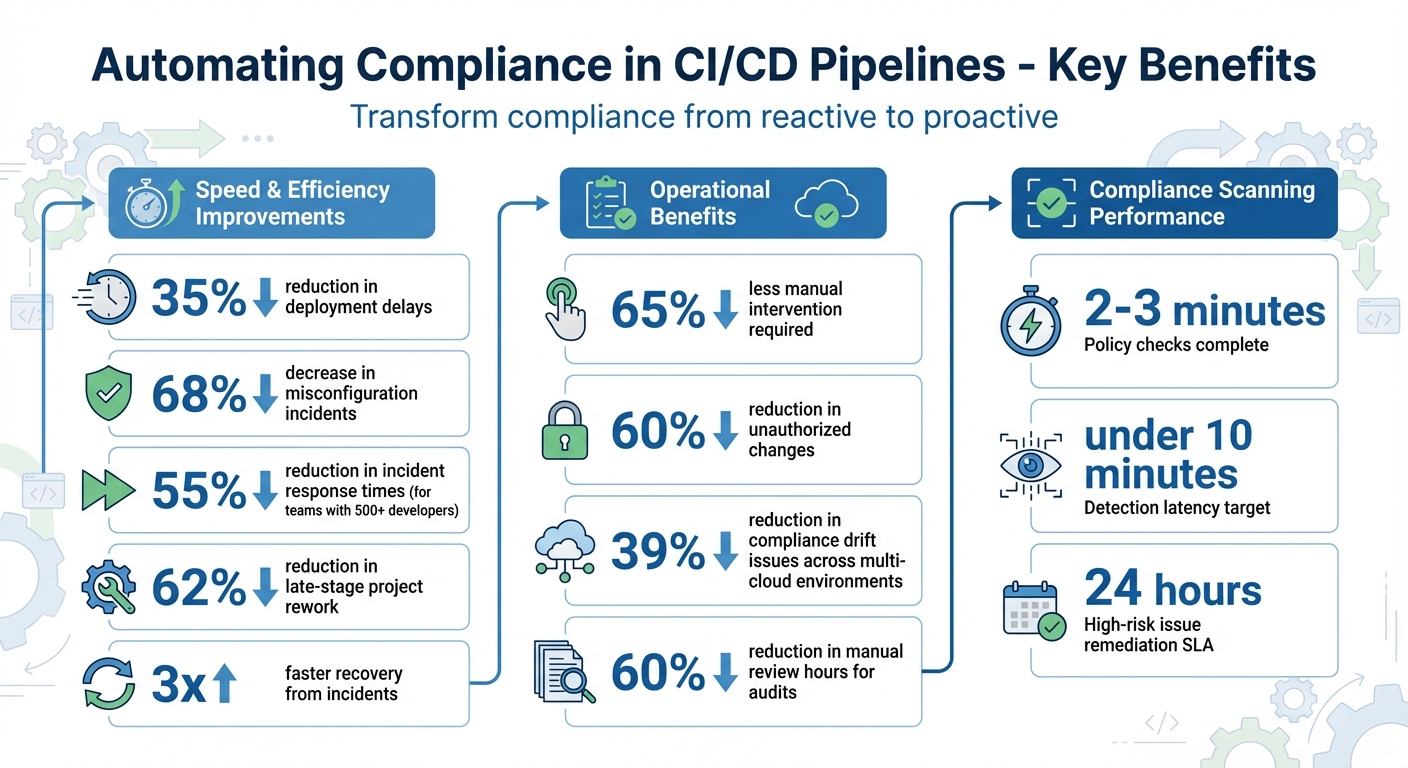
Benefits of Automated Compliance in CI/CD Pipelines: Key Statistics
DevSecOps Governance: Automate Compliance Checks in Your CI/CD Pipeline
sbb-itb-18d4e20
Mapping Regulations to Technical Controls
Turning abstract regulations into actionable, testable conditions is essential for ensuring compliance. For example, a HIPAA directive to "implement encryption for ePHI" can be translated into a clear policy: all RDS databases and S3 buckets tagged with "PHI" must have storage encryption enabled, and all traffic must use TLS 1.2 or higher. This approach connects regulatory requirements to specific resource attributes and stages within the CI/CD pipeline. By doing so, organizations can align technical controls with compliance demands at every step.
Key U.S. Regulations and Standards
Different industries face distinct compliance challenges.
- Healthcare organizations must adhere to HIPAA, which enforces encryption for electronic protected health information and strict access controls, with stiff financial consequences for non-compliance.
- Retail and eCommerce businesses handling credit card transactions must follow PCI DSS, which prohibits storing unencrypted CVVs and PINs.
- SaaS and Fintech companies often pursue SOC 2 certification, requiring strong security measures like environment segregation and role-based access control.
- Companies managing customer data must also comply with GDPR and CCPA/CPRA, which mandate automated audit logs and consent-verification mechanisms.
Creating a Compliance Requirements Matrix
A compliance requirements matrix links regulatory mandates to specific CI/CD pipeline stages and technical checks. For instance:
- Source control: Enforce code ownership, run static analysis, and detect secrets before commits.
- Build stage: Conduct software composition analysis to identify vulnerabilities in dependencies.
- Deployment stage: Implement infrastructure-as-code scanning, environment segregation, and role-based access controls.
Take PCI DSS as an example: its encryption requirements can be enforced through automated checks that verify data encryption both in transit and at rest. Similarly, a SOC 2 control for separation of duties might rely on deployment scripts enforcing RBAC policies. Naming policy files to reference the specific control they enforce (e.g., pci_dss_3_4_1.rego) creates a direct, auditable connection between code and regulatory requirements. This structured approach also integrates seamlessly with version control systems, ensuring ongoing audit readiness.
Version Control for Compliance Documentation
Treating compliance policies as critical code - and storing them in Git - ensures every change is tracked, reviewed, and versioned. For example, when an encryption policy is updated, Git’s commit history provides a transparent record of who made the change, when, and why. Organizations using this method report a 39% reduction in compliance drift issues across multi-cloud environments.
Tagging each release candidate with metadata, such as code review details, test coverage, and approval logs, further strengthens audit trails. Additionally, using immutable storage solutions like S3 buckets with Object Lock ensures policy decision logs remain tamper-proof for external audits.
"Your policies, detection scripts, and reporting queries are critical code. They should be stored in Git, peer-reviewed, tested, and versioned."
- Policyascode.dev
Implementing Policy as Code in CI/CD Pipelines
When it comes to automated compliance, integrating Policy as Code (PaC) into your CI/CD pipelines ensures every change aligns with regulatory requirements without manual intervention.
What Is Policy as Code?
Policy as Code (PaC) involves translating compliance rules into executable code. This allows systems to automatically verify whether resources meet predefined standards, eliminating the need for manual reviews. By separating decision-making from enforcement, PaC centralizes policies while still giving developers the freedom to innovate. For instance, a policy might automatically check if all S3 buckets tagged with "customer-data" have encryption enabled, sparing the security team from manually reviewing each deployment.
Tools for Policy as Code
Open Policy Agent (OPA) is a versatile policy engine and a graduated project under the Cloud Native Computing Foundation (CNCF). It is adept at evaluating JSON and YAML data structures, making it compatible with a wide range of software systems through its REST API, Go library, or WebAssembly runtime. Another useful tool is Conftest, which tests configuration files in CI/CD pipelines. It supports various formats, including HCL (Terraform), Kubernetes manifests, Jsonnet, and Dockerfiles. Both tools rely on Rego, a policy language tailored for working with hierarchical data.
"OPA serves as a powerful 'swiss army knife' for implementing custom checks required by your organization that might be difficult to implement in a script or in another tool." - Open Policy Agent Documentation
By leveraging tools like OPA and Conftest, you can seamlessly integrate policy checks into your pipelines.
Adding Policy Checks to Pipelines
The pull request stage is the ideal point to integrate policy checks, as it catches violations before code merges into the main branch. Tools like OPA can be installed (e.g., using open-policy-agent/setup-opa for GitHub workflows) to scan configuration files. Configure these tools to evaluate infrastructure files against your Rego policies, using CLI flags such as --fail to block merges for critical issues. For less severe violations, use Advisory mode to issue warnings. Aim for policy checks to complete within 2–3 minutes.
To balance enforcement, adopt two modes: Blocking mode for critical violations that halt the process and Advisory mode for warnings about best practices. Always provide clear, actionable feedback in violation messages, explaining what went wrong, why it matters, and how to resolve it. Report these results directly in pull request comments. For larger teams, OPA Bundles can be used to distribute updated policies automatically across all CI runners, avoiding manual updates.
Before deploying policies, validate them thoroughly using the opa test framework. Use flags like --coverage and --fail-on-empty to ensure complete rule coverage and reliability. This step ensures your policies are solid and ready to maintain compliance throughout production.
Automating Compliance Scans in CI
Building on the foundation of policy-as-code, the next logical step is embedding automated compliance scans directly into your Continuous Integration (CI) pipeline.
Shifting Compliance Left in CI
By integrating compliance checks early in the development process - through pre-commit hooks and pull request gates - you can get feedback in minutes rather than weeks. This "shift left" approach makes compliance a natural part of development instead of a roadblock. Pre-commit hooks provide the fastest feedback by running lightweight linters on a developer's local machine. Meanwhile, pull request gates act as the primary enforcement point. As code progresses, build and deployment stages add further validation, checking artifacts like container images and environment-specific configurations.
To keep development moving, policy checks should finish within 2–3 minutes. Security scanner Docker images should ideally stay under 50 MB, with an absolute maximum of 1.46 GB to ensure efficiency.
Compliance Scanning Tools
Here’s a breakdown of the main scanning methods to include in your CI pipeline:
- Static Application Security Testing (SAST): Scans source code for vulnerabilities before the application runs.
- Software Composition Analysis (SCA): Examines dependency files like
package.jsonorgo.modfor security flaws and licensing issues. - Infrastructure as Code (IaC) Scanning: Validates configuration files, such as Terraform plans or Kubernetes manifests, against organizational policies.
- Dynamic Application Security Testing (DAST): Simulates real-world attacks on running applications to find risks like weak encryption or insecure authentication.
These tools can be integrated into CI pipelines via plugins, CLI binaries, or APIs. Plugins for platforms like GitHub Actions or GitLab CI are the simplest to set up. CLI binaries (e.g., OPA, Conftest, or Checks CLI) work well for any CI platform that supports scripted commands. APIs offer the most flexibility, enabling you to automate scans and retrieve reports programmatically.
Secrets scanning is another critical layer, helping identify hardcoded credentials, API keys, or PII in both code and images. A 2024 study revealed that 84% of organizations reported at least one API security breach within a year.
Configuring Compliance Scans
CI pipelines use exit codes to determine whether a build should proceed: 0 for success and 1 for failure. Configure scanning tools to return non-zero exit codes for critical issues while treating non-critical warnings as advisory.
For authentication, use limited-permission service accounts stored securely in your CI platform’s secret management system, such as GitHub Secrets.
Scanners should output results in JSON format to allow flexible data transformation and maintain an audit-ready evidence trail. Use a SECURE_LOG_LEVEL setting (e.g., info, warn, error) to cut through the noise and direct developers’ attention to high-priority violations. For GitLab users, naming jobs after the scanner type (e.g., _sast or _dependency_scanning) keeps things consistent. Keep in mind that GitLab enforces a limit of 20 identifiers per vulnerability for tracking purposes.
To prevent sensitive data from leaking between pipeline runs, scans should be performed in isolated nodes or containers. This is especially important when handling customer data or regulated information. Large organizations can centralize policy updates using systems like OPA Bundles, which automatically distribute changes to all CI runners.
Managing Compliance for Teams and Audits
Once automated scans are in place, the next step is ensuring your teams are aligned and your audit processes are rock-solid. While automation lays the groundwork, managing teams effectively and maintaining clear audit trails are crucial. Compliance isn’t just one department’s job - it’s a shared responsibility across development, security, and operations.
Defining Team Roles and Responsibilities
Role-Based Access Control (RBAC) is key to limiting access. It ensures only authorized individuals can handle sensitive tasks like accessing secrets, modifying pipeline settings, or promoting code to production. To minimize risks, enforce separation of duties - no developer should be able to approve their own production deployment. Additionally, applying the principle of least privilege ensures that users and services only have the access they absolutely need to perform their tasks.
To clarify ownership, consider using a RACI matrix (Responsible, Accountable, Consulted, Informed) at the start of each product increment. Here’s how responsibilities might break down:
- Development teams: Focus on secure coding practices and fixing vulnerabilities early.
- Security teams: Define policies and provide oversight.
- Operations teams: Manage infrastructure, environment segregation, and integrity.
- Compliance and legal teams: Map regulatory requirements to technical implementations.
Clear roles and responsibilities not only secure your pipeline but also prepare you for audits. In fact, organizations that embed security guardrails into their development automation report a 68% drop in misconfiguration incidents.
"One of the most challenging aspects is embedding compliance into day-to-day business and technical operations, rather than treating it as the responsibility of a single team. To overcome this, organizations should start by cultivating a culture where compliance is seen as a shared responsibility."
- Faisal Khan, GRC Solutions Expert, Vanta
Automate ticket generation for compliance infractions in your pipelines, categorizing them by severity and linking them to specific regulatory requirements. Require multi-factor authentication for users with elevated permissions, and conduct quarterly tabletop exercises where teams analyze sample codebases for policy violations and suggest fixes.
Tracking Compliance Metrics and Violations
Automated tools can flag policy breaches, but integrated dashboards take it a step further by offering real-time compliance metrics. By aggregating data from all pipeline stages, these dashboards can provide on-demand evidence for auditors. For example, naming policy files to reference specific regulatory standards (like pci_dss_3_4_1.rego) makes it easier to trace compliance efforts.
Organizations with over 500 developers have reported a 55% reduction in incident response times by integrating automated validation steps. Key metrics to monitor include:
- Detection latency: Aim for under 10 minutes.
- Remediation SLAs: Set targets, like resolving high-risk issues within 24 hours.
Teams that automate policy evaluation processes recover from incidents three times faster and reduce unauthorized changes by over 60%.
Incorporate violation alerts directly into pull requests, providing clear remediation steps. When rolling out new rules, start with an "Advisory" or "Warn" mode that allows pipelines to proceed while notifying developers. Once the team is comfortable, switch to "Blocking" mode to enforce compliance. Continuous drift detection is another helpful tool - it scans live environments for manual changes or configuration drift that could violate policies.
Creating an Audit-Ready Evidence Trail
To streamline audits, build an evidence pipeline that collects data from multiple sources like cloud APIs, policy evaluation logs, CI/CD logs, vulnerability scanners, and activity logs (e.g., CloudTrail). Store this information in a centralized, queryable data lake. For added security, save logs in immutable WORM (Write Once, Read Many) storage, such as S3 buckets with Object Lock. This approach can cut manual review hours by over 60%.
Add traceability to your release candidates by tagging them with approval evidence, code review details, and test coverage. Treat policies, detection scripts, and reporting queries like critical code - store them in version control systems like Git to preserve a full history of what was enforced and when. Use digital signatures with tools like Sigstore or Cosign to verify the authenticity of container images and commits.
To meet regulatory requirements, retain evidence of automated evaluations for at least 12 months. Set up dashboards and automated workflows to generate compliance reports for frameworks like SOC 2 or HIPAA on demand. These logs should show not only that a control is currently passing but that it has consistently done so over time. By automating auditing processes, organizations can reduce manual intervention by up to 65%.
Conclusion: Scaling Compliance Automation
Automating compliance within CI/CD pipelines transforms how teams handle regulatory requirements. Instead of relying on periodic and often stressful audits, teams can shift to continuous, provable compliance, where evidence is automatically generated as part of everyday workflows. This approach creates a steady and scalable framework for maintaining compliance through code.
The cornerstone of scaling compliance automation lies in treating compliance as code. By adopting this methodology, teams can simplify operations and make scaling controls more manageable. Tools like Open Policy Agent (OPA) allow compliance rules to exist independently of infrastructure, so updates to policies don’t require overhauling the entire pipeline. A practical starting point? Focus on 10–15 critical controls within a single compliance framework, then gradually expand.
"Compliance automation shifts the paradigm from periodic, stressful audits to a state of continuous, provable compliance." - policyascode.dev
Organizations that integrate compliance checks early in the development process reap major benefits. These include a 62% reduction in late-stage project rework, three times faster recovery from incidents, up to 65% less manual intervention, and a 55% cut in incident response times for teams with over 500 developers. By implementing a continuous cycle of prevention, detection, remediation, and reporting, teams can quickly identify and address violations. Storing audit evidence in immutable WORM storage - like S3 buckets with Object Lock - further ensures the integrity of audit records.
Automated compliance brings more than just audit readiness. It reduces unauthorized changes by over 60% and minimizes misconfigurations by 68%. As regulations evolve, this approach allows teams to adapt seamlessly with simple policy updates. By embedding automation into the development lifecycle, compliance becomes an integral, ongoing process rather than an afterthought, ensuring continuous enforcement across your pipeline.
FAQs
What is Policy as Code, and how does it enhance compliance in CI/CD pipelines?
Policy as Code is a way to define compliance policies using code, allowing for automated, real-time checks directly within CI/CD pipelines. By embedding these checks early in the development cycle, teams can catch and fix potential compliance issues long before they make it to production.
This method streamlines compliance by offering continuous monitoring, delivering quicker feedback to developers, and minimizing the need for costly fixes down the line. It’s an efficient way for organizations to stay aligned with regulatory standards without disrupting their development processes.
What are the main advantages of automating compliance checks in CI/CD pipelines?
Automating compliance checks within CI/CD pipelines brings early detection of policy violations, allowing teams to tackle issues before they grow into bigger problems. It also ensures continuous monitoring and automatically generates audit evidence, cutting down the need for manual effort.
By simplifying these tasks, automation reduces the chances of compliance failures, speeds up audit processes, and boosts delivery timelines. This method not only improves efficiency but also enables quicker responses to incidents, helping teams stay aligned with regulatory requirements with less hassle.
How can organizations integrate regulatory compliance into their CI/CD pipelines?
To weave regulatory compliance into CI/CD pipelines, organizations can align legal requirements - like data encryption, privacy-by-design, or audit log retention - with policy-as-code rules. These rules are then automated at critical stages of the pipeline, ensuring compliance is maintained without slowing down development.
The process begins by identifying relevant frameworks, such as GDPR, CCPA, SOC 2, or PCI DSS, and breaking down each requirement into actionable technical checks. For instance, you might verify that all infrastructure resources have encryption enabled. By version-controlling these checks alongside your application code, you can easily adapt to regulatory updates as they occur.
Compliance checks can be integrated at various pipeline stages. For example:
- Validate infrastructure configurations during code commits.
- Scan for vulnerabilities during the build stage.
- Enforce security and licensing policies during testing.
- Apply runtime guardrails during deployment.
Automating these steps not only reduces manual work but also ensures traceability and speeds up delivery - all while keeping compliance intact.
Optiblack simplifies this process by helping organizations implement policy-as-code, embed compliance checks into their CI/CD pipelines, and generate audit-ready reports. This makes scaling compliance both practical and efficient.